제목이 곧 내용
동작 구조는 다음과 같습니다

PowerShell
<#
.SYNOPSIS
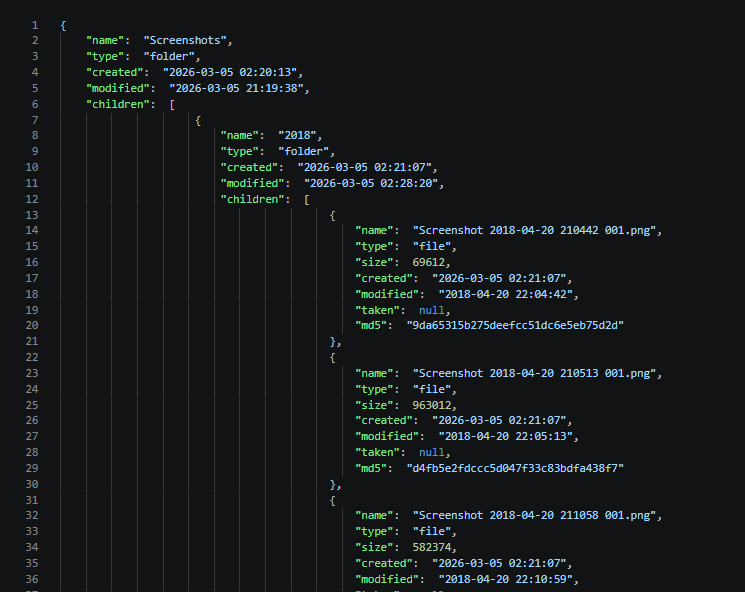
    지정한 폴더의 디렉터리/파일 트리를 JSON으로 내보냅니다.

.DESCRIPTION
    -Folders 로 전달한 각 경로를 재귀 스캔하여 폴더/파일 메타데이터
    (이름, 크기, 생성일, 수정일, 촬영일, MD5 해시)를 수집하고
    <FolderName>.json 파일로 저장합니다.
    처리 결과 통계는 _stats.json 에 함께 기록됩니다.

.PARAMETER Folders
    스캔할 폴더 경로를 하나 이상 지정합니다.
    예) "C:\Photos", "D:\Backup"

.PARAMETER OutputDir
    JSON 파일을 저장할 디렉터리입니다. 기본값은 스크립트 파일과 같은 폴더입니다.

.PARAMETER NoMd5
    지정하면 각 파일의 MD5 해시 계산을 건너뜁니다.
    대용량 파일이 많을 때 처리 속도를 높이는 데 유용합니다.

.EXAMPLE
    # 단일 폴더 스캔
    .\export_structure.ps1 -Folders "C:\Pictures"

.EXAMPLE
    # 여러 폴더를 한 번에 스캔
    .\export_structure.ps1 -Folders "C:\Photos\","D:\Backup\"

.EXAMPLE
    # 출력 경로 지정 + MD5 생략
    .\export_structure.ps1 -Folders "C:\Photos" -OutputDir "D:\output" -NoMd5

.NOTES
    출력 JSON: <OutputDir>\<FolderName>.json
    통계 JSON: <OutputDir>\_stats.json
#>
param(
    # 재귀 스캔할 폴더 목록 (각 폴더 → <FolderName>.json)
    [Parameter(Mandatory=$true)]
    [string[]]$Folders,

    # JSON 저장 경로 (기본값: 스크립트 파일과 같은 폴더)
    [string]$OutputDir = (Split-Path $MyInvocation.MyCommand.Path -Parent),

    # MD5 해시 계산 생략 (대용량 파일이 많을 때 속도 향상)
    [switch]$NoMd5
)

$shell = New-Object -ComObject Shell.Application
$md5   = if (-not $NoMd5) { [System.Security.Cryptography.MD5]::Create() } else { $null }

$stats = [ordered]@{
    started_at    = (Get-Date).ToString("yyyy-MM-dd HH:mm:ss")
    finished_at   = $null
    elapsed_sec   = $null
    folders_input = $Folders.Count
    folders_ok    = 0
    folders_skip  = 0
    dirs_total    = 0
    files_total   = 0
    bytes_total   = 0
    per_folder    = @()
}
$startTime = Get-Date

function Get-FileMD5 {
    param([string]$Path)
    $stream = $null
    try {
        $stream = [System.IO.File]::OpenRead($Path)
        $bytes  = $md5.ComputeHash($stream)
        return [System.BitConverter]::ToString($bytes).Replace("-", "").ToLower()
    } catch { return $null }
    finally { if ($stream) { $stream.Dispose() } }
}

function Get-DirTree {
    param([string]$Path)
    $item = Get-Item -LiteralPath $Path
    $stats.dirs_total++
    $node = [ordered]@{
        name     = $item.Name
        type     = "folder"
        created  = $item.CreationTime.ToString("yyyy-MM-dd HH:mm:ss")
        modified = $item.LastWriteTime.ToString("yyyy-MM-dd HH:mm:ss")
        children = @()
    }
    foreach ($child in (Get-ChildItem -LiteralPath $Path | Sort-Object Name)) {
        if ($child.PSIsContainer) {
            $node.children += Get-DirTree -Path $child.FullName
        } else {
            $shellFolder = $shell.Namespace($child.DirectoryName)
            $shellItem   = $shellFolder.ParseName($child.Name)
            $dateTaken   = $shellFolder.GetDetailsOf($shellItem, 12)
            $fileNode = [ordered]@{
                name     = $child.Name
                type     = "file"
                size     = $child.Length
                created  = $child.CreationTime.ToString("yyyy-MM-dd HH:mm:ss")
                modified = $child.LastWriteTime.ToString("yyyy-MM-dd HH:mm:ss")
                taken    = if ($dateTaken -and $dateTaken.Trim() -ne "") { ($dateTaken -replace '[\u200E\u200F\u202A-\u202E\u2066-\u2069]', '').Trim() } else { $null }
                md5      = if ($NoMd5) { $null } else { Get-FileMD5 -Path $child.FullName }
            }
            $stats.files_total++
            $stats.bytes_total += $child.Length
            Write-Host "  $($child.FullName)"
            $node.children += $fileNode
        }
    }
    return $node
}

if (-not (Test-Path -LiteralPath $OutputDir)) {
    New-Item -ItemType Directory -Path $OutputDir | Out-Null
}

foreach ($folder in $Folders) {
    if (-not (Test-Path -LiteralPath $folder)) {
        Write-Warning "Directory not found, skipping: $folder"
        $stats.folders_skip++
        continue
    }
    $beforeDirs  = $stats.dirs_total
    $beforeFiles = $stats.files_total
    $beforeBytes = $stats.bytes_total

    Write-Host "Processing: $folder ..."
    $tree    = Get-DirTree -Path $folder
    $json    = $tree | ConvertTo-Json -Depth 100
    $outFile = Join-Path $OutputDir "$((Split-Path $folder -Leaf)).json"
    [System.IO.File]::WriteAllText($outFile, $json, [System.Text.Encoding]::UTF8)

    $fDirs  = $stats.dirs_total  - $beforeDirs
    $fFiles = $stats.files_total - $beforeFiles
    $fBytes = $stats.bytes_total - $beforeBytes
    $stats.folders_ok++
    $stats.per_folder += [ordered]@{
        folder = $folder
        output = $outFile
        dirs   = $fDirs
        files  = $fFiles
        bytes  = $fBytes
    }
    Write-Host "Done: $outFile  [$fDirs dirs / $fFiles files / $fBytes bytes]"
}

$stats.finished_at = (Get-Date).ToString("yyyy-MM-dd HH:mm:ss")
$stats.elapsed_sec = [math]::Round(((Get-Date) - $startTime).TotalSeconds, 1)

$statsJson  = $stats | ConvertTo-Json -Depth 10
$statsFile  = Join-Path $OutputDir "_stats.json"
[System.IO.File]::WriteAllText($statsFile, $statsJson, [System.Text.Encoding]::UTF8)

Write-Host ""
Write-Host "=== Summary ==="
Write-Host "  Folders : $($stats.folders_ok) ok / $($stats.folders_skip) skipped"
Write-Host "  Dirs    : $($stats.dirs_total)"
Write-Host "  Files   : $($stats.files_total)"
Write-Host "  Bytes   : $($stats.bytes_total)"
Write-Host "  Elapsed : $($stats.elapsed_sec) sec"
Write-Host "  Stats   : $statsFile"

if ($md5) { $md5.Dispose() }
출력 예시