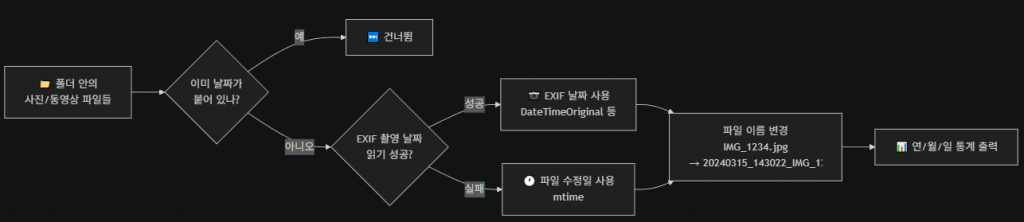
아이폰에서 추출한 사진 이름 앞에 날짜시간을 붙이는 스크립트입니다. 이미지 또는 동영상 파일 이름에 아직 날짜시간이 없는 전재로 합니다.
사진에서 EXIF 값 추출해서 촬영일 기준으로 수정합니다. 예시는 다음과 같습니다.
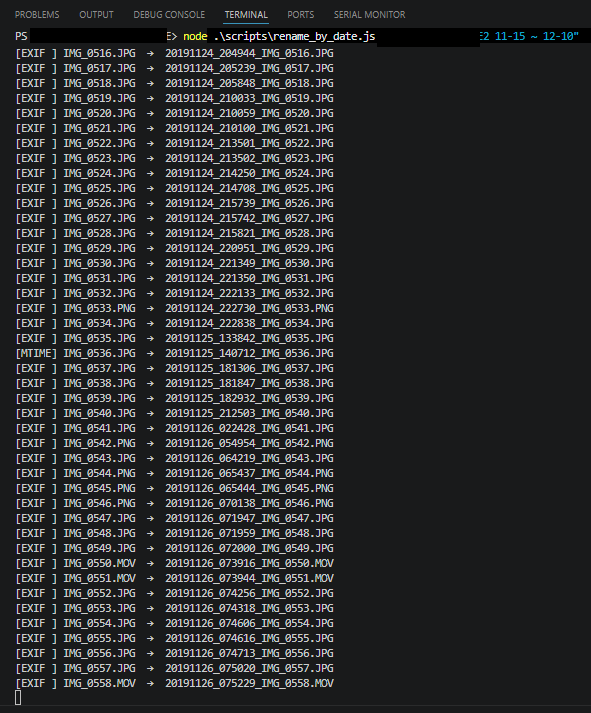
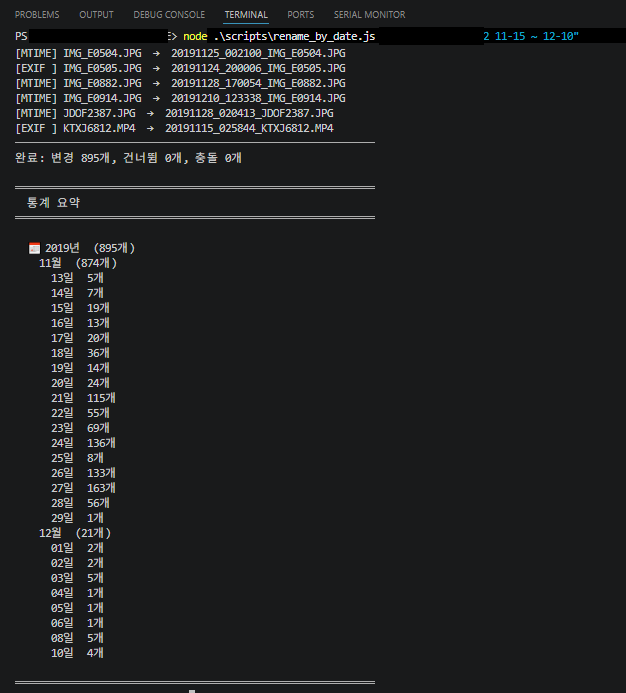
스크립트 실행 완료 후 출력은 다음과 같습니다.
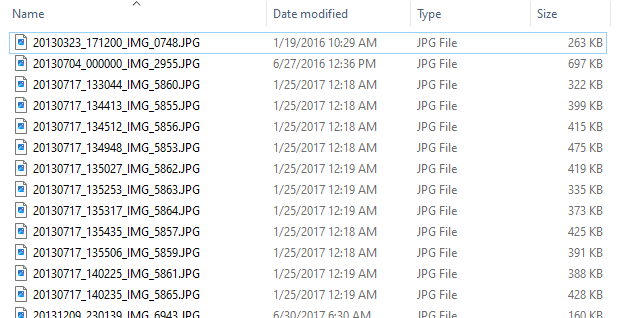
실제 윈도우 탐색기에서 확인하면 다음과 같이 수정되어 있습니다.
Node.js v22/24 LTS 기준
npm install exiftool-vendored파일명에서 날짜 형식은 formatDateTime() 함수 수정하면 됩니다
/**
 * rename_by_date.js
 *
 * ./target 폴더의 이미지/동영상 파일을 아래 형식으로 일괄 이름 변경:
 *   YYYYMMDD_hhmmss_원본파일이름.ext
 *
 * 날짜 우선순위:
 *   1. EXIF DateTimeOriginal
 *   2. EXIF CreateDate / MediaCreateDate
 *   3. 파일 수정일 (mtime)
 *
 * 사용법:
 *   node scripts/rename_by_date.js [경로]             # 실제 변경 (기본값: ./target)
 *   node scripts/rename_by_date.js [경로] --dry-run   # 변경 내용만 출력 (실제 변경 없음)
 *
 * 예:
 *   node scripts/rename_by_date.js
 *   node scripts/rename_by_date.js D:\Photos\2024
 *   node scripts/rename_by_date.js "C:\My Photos" --dry-run
 */

'use strict';

const fs   = require('fs');
const path = require('path');
const { exiftool } = require('exiftool-vendored');

// ── 설정 ──────────────────────────────────────────────────────────────────────

const args       = process.argv.slice(2).filter(a => a !== '--dry-run');
const TARGET_DIR = args[0] ? path.resolve(args[0]) : path.resolve(__dirname, '..', 'target');
const DRY_RUN    = process.argv.includes('--dry-run');

const SUPPORTED_EXTS  = new Set([
  '.jpg', '.jpeg', '.heic', '.heif', '.png', '.gif', '.tiff', '.tif',
  '.mov', '.mp4', '.m4v', '.avi', '.3gp', '.mkv'
]);
const ALREADY_RENAMED = /^\d{8}_\d{6}_/;

// ── 날짜 포맷 ─────────────────────────────────────────────────────────────────

const pad = n => String(n).padStart(2, '0');

function formatDateTime(dt) {
  if (dt && typeof dt === 'object' && typeof dt.year === 'number') {
    const { year: y, month = 1, day = 1, hour = 0, minute = 0, second = 0 } = dt;
    return `${y}${pad(month)}${pad(day)}_${pad(hour)}${pad(minute)}${pad(second)}`;
  }
  const d = dt instanceof Date ? dt : new Date(dt);
  return `${d.getFullYear()}${pad(d.getMonth()+1)}${pad(d.getDate())}_${pad(d.getHours())}${pad(d.getMinutes())}${pad(d.getSeconds())}`;
}

// ── EXIF 날짜 읽기 ────────────────────────────────────────────────────────────

async function readTakenDate(filePath) {
  try {
    const tags = await exiftool.read(filePath);
    return tags.DateTimeOriginal ?? tags.CreateDate ?? tags.MediaCreateDate ?? tags.TrackCreateDate ?? null;
  } catch { return null; }
}

// ── 메인 ─────────────────────────────────────────────────────────────────────

function collectFiles(dir) {
  return fs.readdirSync(dir).flatMap(name => {
    const full = path.join(dir, name);
    return fs.statSync(full).isDirectory()
      ? collectFiles(full)
      : SUPPORTED_EXTS.has(path.extname(name).toLowerCase()) ? [full] : [];
  });
}

async function main() {
  if (!fs.existsSync(TARGET_DIR)) {
    console.error(`[ERROR] 대상 폴더를 찾을 수 없습니다: ${TARGET_DIR}`);
    process.exit(1);
  }

  const files = collectFiles(TARGET_DIR);
  if (files.length === 0) { console.log('처리할 파일이 없습니다.'); return; }

  console.log(`대상 파일 수: ${files.length}${DRY_RUN ? '  [DRY-RUN 모드]' : ''}`);
  console.log('─'.repeat(60));

  let renamed = 0, skipped = 0, conflict = 0;
  const statYear = new Map(), statMonth = new Map(), statDay = new Map();

  function recordStat(prefix) {
    const y = prefix.slice(0, 4), m = prefix.slice(4, 6), d = prefix.slice(6, 8);
    const ym = `${y}-${m}`, ymd = `${y}-${m}-${d}`;
    statYear .set(y,   (statYear .get(y)   ?? 0) + 1);
    statMonth.set(ym,  (statMonth.get(ym)  ?? 0) + 1);
    statDay  .set(ymd, (statDay  .get(ymd) ?? 0) + 1);
  }

  for (const filePath of files) {
    const baseName = path.basename(filePath);
    const relPath  = path.relative(TARGET_DIR, filePath);

    if (ALREADY_RENAMED.test(baseName)) {
      console.log(`[SKIP   ] ${relPath}`);
      skipped++; recordStat(baseName.slice(0, 15));
      continue;
    }

    const exifDt  = await readTakenDate(filePath);
    const prefix  = formatDateTime(exifDt ?? fs.statSync(filePath).mtime);
    const source  = exifDt ? 'EXIF' : 'MTIME';
    const newName = `${prefix}_${baseName}`;
    const newPath = path.join(path.dirname(filePath), newName);
    const relNew  = path.relative(TARGET_DIR, newPath);

    if (fs.existsSync(newPath)) {
      console.log(`[CONFLICT] ${relPath}  →  ${relNew}  (이미 존재)`);
      conflict++; recordStat(prefix);
      continue;
    }

    console.log(`[${source.padEnd(5)}] ${relPath}  →  ${relNew}`);
    if (!DRY_RUN) fs.renameSync(filePath, newPath);
    renamed++; recordStat(prefix);
  }

  console.log('─'.repeat(60));
  console.log(`완료: 변경 ${renamed}개, 건너뜀 ${skipped}개, 충돌 ${conflict}개`);
  if (DRY_RUN) console.log('(DRY-RUN: 실제 파일은 변경되지 않았습니다)');

  // ── 통계 출력 ───────────────────────────────────────────────────────────────
  console.log('\n' + '═'.repeat(60));
  console.log('  통계 요약');
  console.log('═'.repeat(60));

  for (const y of [...statYear.keys()].sort()) {
    console.log(`\n  📅 ${y}년  (${statYear.get(y)}개)`);
    for (const ym of [...statMonth.keys()].filter(k => k.startsWith(y)).sort()) {
      const [, m] = ym.split('-');
      console.log(`    ${m}월  (${statMonth.get(ym)}개)`);
      for (const ymd of [...statDay.keys()].filter(k => k.startsWith(ym)).sort()) {
        const [, , dd] = ymd.split('-');
        console.log(`      ${dd}일  ${statDay.get(ymd)}개`);
      }
    }
  }
  console.log('\n' + '═'.repeat(60));
}

main()
  .catch(err => { console.error('[FATAL]', err); process.exit(1); })
  .finally(() => exiftool.end());