
http://blog.tunalabs.io/179208로 접속시 강제로 https://blog.tunalabs.io/179208 로 리다이렉트 하는 방법.
using .htaccess
RewriteEngine On
RewriteCond %{HTTPS} off
RewriteRule ^(.*)$ https://%{HTTP_HOST}%{REQUEST_URI} [L,R=301]
using web.config
ROOT 디렉토리에 web.config 파일을 생성 후 다음내용을 넣고 저장한다.
→ IIS Rewirte 모듈이 필요 http://www.iis.net/downloads/microsoft/url-rewrite
<configuration>
    <system.webServer>
    <rewrite>
        <rules>
            <rule name="HTTP to HTTPS redirect" stopProcessing="true">
                <match url="(.*)" />
                <conditions>
                <add input="{HTTPS}" pattern="off" ignoreCase="true" />
                </conditions>
                <action type="Redirect" redirectType="Permanent" url="https://{HTTP_HOST}/{R:1}" />
            </rule>
        </rules>
    </rewrite>
    </system.webServer>
</configuration>
그럼 HTTP 프로토콜로 접속하면 자동으로 HTTPS 프로토콜로 리다이렉트되면서 모든 데이터가 암호화되어 서버와 통신한다.
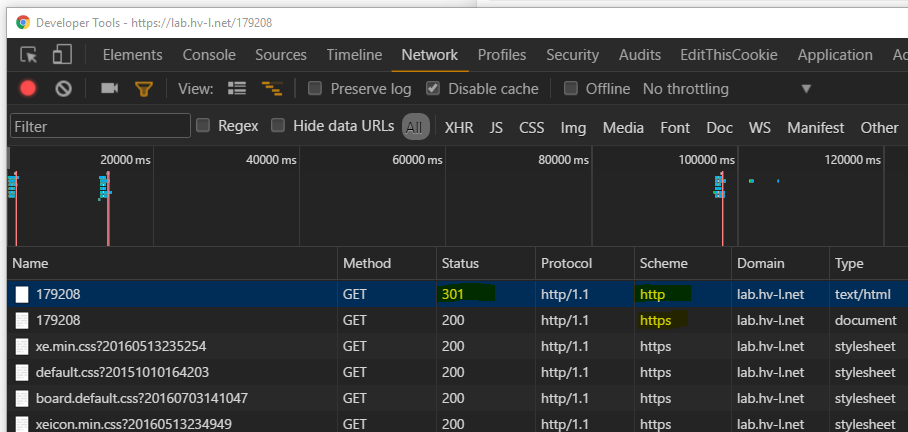
참고

2 replies on “HTTP 접속시 HTTPS로 강제 리다이렉트 (아파치, IIS)”
감사합니다! 덕분에 .htaccess 파일 변경해서 해결했습니다. ^^
축하드립니다